Sign the company. Work the business they send.
This is the lender side. If you're a broker or a correspondent lender looking for lenders to work with, you want the Leaf360 TPO marketplace instead.
Looking for wholesale lenders to sign up with? That's Leaf360 TPO, over in the Mortgage CRM. This is the other side. Here you're the lender, and these are the companies applying to you.
How a broker relationship moves
Same five steps for every licensed mortgage company, from their first application to the volume they send you.
- 01
They apply
A licensed mortgage company applies to work with you. Broker Form Questions are your own questions, so the application asks what your shop actually needs to know.
- 02
They move through the pipeline
Pipeline splits into a Leads Pipeline and an Applicants Pipeline, the two stages a company moves through before it's active.
- 03
You approve or decline
Broker Flow holds every application as Pending, Approved or Declined, alongside Milestone Emails that keep the applicant posted.
- 04
They go active
Approved companies land in Active Brokers, with All Brokers plus Branches, Loan Officers and Support Staff for the people who work there.
- 05
You watch the production
Connect your LOS and their submissions and volume land here, right next to the relationship. The Dashboard shows your numbers for the period, with tasks next to broker performance and a volume chart underneath.
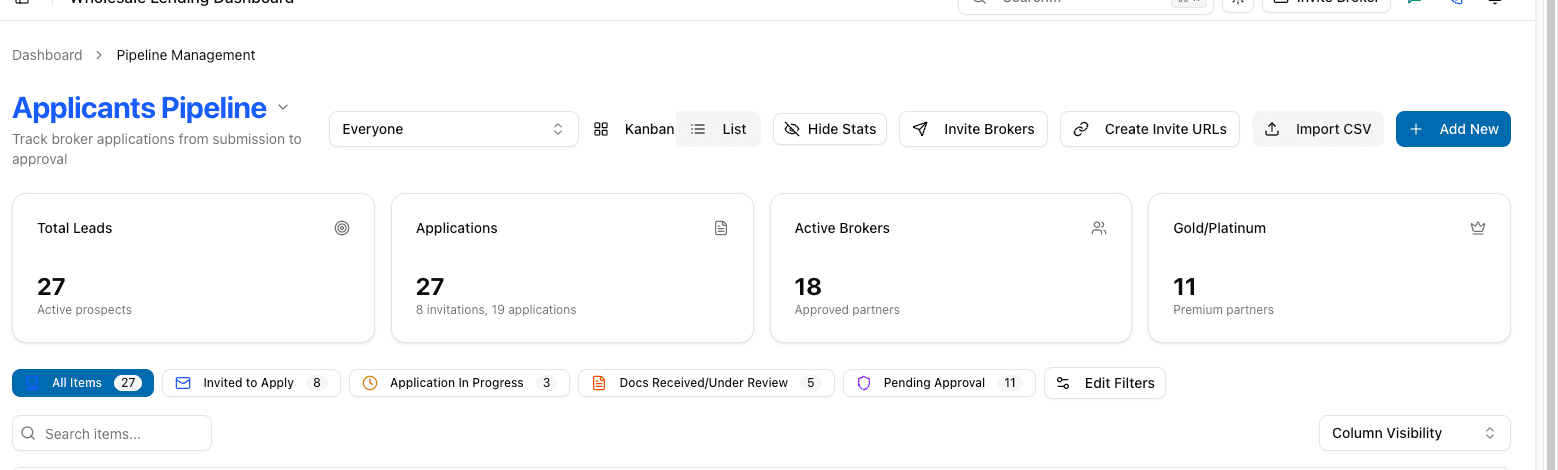
The Applicants Pipeline, populated
The lender-side view from the Leaf360 demo workspace: broker-application totals and the stage each application sits in.
Evaluating Wholesale CRM for a larger lending team? See the Enterprise evaluation path.
What the workspace does
The four an AE touches every day.
Broker Flow, from application to decision
Applications sit as Pending, Approved or Declined, next to Broker Form Questions and Milestone Emails. Signing a licensed mortgage company is a job this workspace does.
Compliance on the record, not in a spreadsheet
Licenses, insurance and signed docs sit on each company's record, so that way you can see what's current and what's due for a recert. Document Vault and Compliance Docs hold the files.
A door that carries your name
The companies you sign get a portal in your branding. They set a password and work through a guided application, sending licenses and insurance. They manage their own LOs and processors, and clear the tasks you still need from them.
Ask Lia answers the scenario call
Ask Lia sits at the top of the sidebar and answers guideline questions out of your own guides, so your AEs stop fielding the same call all day.
Everything in the Wholesale CRM sidebar
- Dashboard: your numbers for the period, tasks next to broker performance, document compliance next to recent applications, and a volume chart.
- Pipeline: a Leads Pipeline and an Applicants Pipeline.
- Active Brokers: All Brokers, Branches, Loan Officers and Support Staff.
- Broker Flow: Pending, Approved and Declined, plus Broker Form Questions and Milestone Emails.
- Document Vault and Compliance Docs for your files.
- Inbox, Tasks and the End of Day Report for the daily work.
- Marketing Suite: Brand Wiki and Email Campaigns.
- Team Analytics: Overview, Leaderboard, Activity Timeline and Conversions, visible only to certain roles such as admins, sales managers and team leads.
- User Management, Team Management for admins, and Settings for Company Profile, Integrations and Billing.
Who it is for
- Wholesale and TPO lenders who fund the loans that brokers and correspondent lenders send them.
- Account executives who sign licensed mortgage companies and work the relationship afterwards.
- The people who keep those companies compliant: licenses, insurance and signed docs, with recerts visible before they lapse.
- Team leads and admins who need Team Analytics across the desk.
Who it is not for
- A loan officer working their own leads, loans and referral partners. That is Leaf360 Mortgage CRM.
- A broker or correspondent lender looking for wholesale lenders to sign up with. That is the Leaf360 TPO marketplace inside the Mortgage CRM.
- Hiring, onboarding and licensing your own staff. That is the Recruiting workspace. A broker never shows up in Recruiting.
Where to go instead
Leaf360 TPO for brokers
The broker side: find wholesale lenders, apply once, and keep approvals and renewals current.
Wholesale lender directory
Browse wholesale mortgage lenders by state, products and programs.
Recruiting
Hiring, onboarding and licensing your own loan officers and staff, which never mixes with your broker partners.
What it costs
The plans published on the pricing page are the Leaf360 Mortgage CRM plans. Wholesale CRM is a separate workspace, and your company subscribes to the workspaces it needs. Read the plans first, then ask Lia what applies to a wholesale desk.
See the published plansQuestions about Wholesale CRM
Leaf360 TPO is the broker-facing lender directory inside the Mortgage CRM. That's where a broker or a correspondent lender finds wholesale lenders and stays approved with them. Wholesale CRM is the lender side: you review those companies, approve or decline them in Broker Flow, and work the relationship afterwards. Leaf360 TPO also shows up in the Wholesale CRM sidebar, below Broker Flow.
Run the lender side on Leaf360.
Applications, approvals, compliance and the volume that follows, all on the desk that signed the company.
This is the lender side. If you're a broker or a correspondent lender looking for lenders to work with, you want the Leaf360 TPO marketplace instead.