Hire your own team. Keep their licenses current.
Recruiting is one of three Leaf360 workspaces. An administrator turns it on for your company and gives you access. Have questions about Recruiting for your company? Ask Lia about the workspace and the next available sales path.
Looking for a job? This isn't a job board. If a mortgage company sent you a link and an access code, you want their candidate portal, not this page.
How a candidate becomes a team member
Five steps, from the first conversation to a licensed member of your team.
- 01
First contact
Anybody you're talking to sits in the Recruiting pipeline, the first of the four stages a person moves through.
- 02
They apply
You send a link and an access code. They create an account on a page carrying your company's name and branding, then verify their email. From there it's personal details, the position and its licensing, ID documents and a final review. They don't have to finish in one sitting, because progress saves as they go.
- 03
You screen
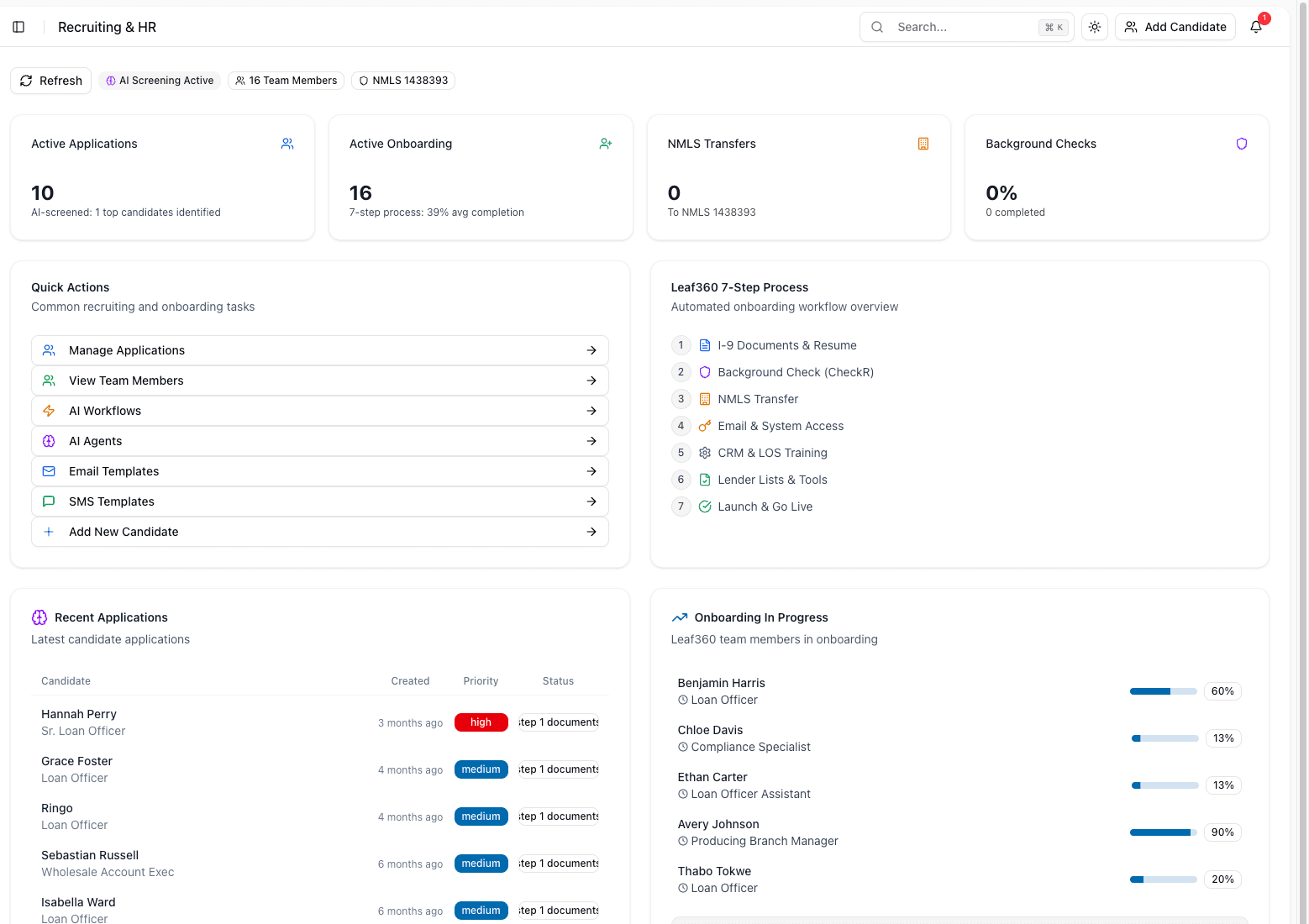
Submitted applications sit in the Applicants pipeline. The Dashboard counts Active Applications, Active Onboarding, NMLS Transfers and Background Checks, including a background check completion rate. It also shows how many applicants have been screened and how many are still in review.
- 04
You onboard
Hires move to the Onboarding pipeline, where Workflows under Automations and Email Templates under Communication carry the steps. Anybody you turn down goes to Rejected Applicants.
- 05
They join the team
Active Team lists All Members, Branches, Loan Officers and Support Staff. Each member's record carries their licensed states and licensing detail, and that's what recerts run off later.
The Recruiting dashboard, populated
From the Leaf360 demo workspace: active applications and onboarding, the onboarding workflow, recent candidates and each person's progress.
Planning 20 or more seats? See the Enterprise evaluation path for Mortgage CRM, Wholesale CRM and Recruiting workspaces.
What the workspace does
The four things a recruiting team, an operations lead or a branch manager uses every day.
Four pipelines, one candidate path
Recruiting, Applicants, Onboarding and Rejected Applicants are the four stages somebody moves through, from first contact to an active member of your team. The Dashboard lists recent hires with their onboarding progress, and recent applications with a priority flag and the latest note on each one.
Licensing lives on the person
Each team member's record carries their licensed states and licensing detail, and Team Reports can be grouped by Licensed States. So that way, when somebody asks which states your own people can write in, you already have the answer.
Onboarding that runs on its own
Automations holds Workflows for onboarding, Communication holds Email Templates, and Tasks and the Documents Vault sit below them. You don't have to keep the steps after a yes in your head.
Payroll in the same place as the record
Payroll covers Commission Requests and Reports, next to the team record they belong to.
Everything in the Recruiting sidebar
- Dashboard: Active Applications, Active Onboarding, NMLS Transfers and Background Checks, with a background check completion rate, recent hires and recent applications.
- Pipelines: Recruiting, Applicants, Onboarding and Rejected Applicants.
- Active Team: All Members, Branches, Loan Officers, Support Staff and Team Reports.
- Communication: Email Templates.
- Automations: Workflows.
- Payroll: Commission Requests and Reports.
- Tasks and the Documents Vault.
- User Management, Team Management and Settings for Stage Management and General Settings.
Who it is for
- Mortgage companies hiring their own loan officers and support staff.
- A dedicated recruiting team, an operations lead, or a branch manager filling their own roster.
- Whoever owns licensing and recerts for your staff, because the licensed states sit on each member record.
- Whoever handles Commission Requests and payroll reporting for that team.
Who it is not for
- Broker partners. Broker companies and their staff live in Wholesale CRM, under Active Brokers, and never appear here.
- Clients, leads and loans. That work belongs in Leaf360 Mortgage CRM.
- Job seekers. If a company invited you to apply, you were sent a link and an access code for their candidate portal.
Where to go instead
What it costs
The plans published on the pricing page are the Leaf360 Mortgage CRM plans. Recruiting is a separate workspace: you see it only if your company subscribes to it and an administrator has given you access. Read the plans first, then ask Lia what applies to your company.
See the published plansQuestions about Recruiting
No. Recruiting is what a mortgage company uses to hire, onboard and license its own people. There's nothing to browse here. If a company invited you to apply, they sent you a link and an access code for their candidate portal, which carries their name and branding rather than ours.
Hire, onboard and license in one workspace.
Four pipelines, licensed states on every team member record, onboarding workflows and commission requests, all in one place.
Recruiting is one of three Leaf360 workspaces. An administrator turns it on for your company and gives you access. Have questions about Recruiting for your company? Ask Lia about the workspace and the next available sales path.