Mortgage CRM for loan officers. Ask Lia who to call today.
She reads your pipeline and tells you which leads are urgent today. Then she drafts the email and the text for each one, off that client's file. Review the drafts, then choose what to send.
You didn't get licensed to configure software.
Most mortgage CRMs assume someone else runs them for you. For most LOs, there is no someone else.
Follow-up slips
Speed to lead decides who wins the client. When follow-up depends on you remembering, deals leak on your busiest days, which are exactly the days you can't afford it.
Five tools per loan
CRM, texting app, email marketing, spreadsheets, calendar. Every extra tool is another place a client can fall through.
CRMs built for admins
Legacy platforms assume a marketing team will set up the drips and the journeys. You're the marketing team.
One question, and today's follow-up is written.
Here's the order he runs it in on the recording.
- 1
Ask which leads are urgent
Type it, or use the mic: "Show me what leads are urgent in my pipeline that I should focus on today." She searches your leads and comes back with the ones that need attention. Four of them, on the recording.
- 2
Ask for a draft per lead
Follow up with "Draft a unique email and SMS for each individual client." She writes a separate pair for every lead, off that client's own file. You'll notice the loan type and the loan amount in each one.
- 3
Review, then send or copy
The drafts sit in the chat until you act. With your inbox connected, one click sends every email from your own address. The texts you copy into each client's profile yourself unless batch texting is on. Asking Lia to text somebody directly is different: that goes out from your team's number right away, so make sure the wording is right before you ask.
Lia can make mistakes, and it says so right under every reply. That's why you read them first.
What a Lia draft looks like before you act
A brief on one loan file from the Leaf360 demo workspace. Lia marked what was stale, expired or missing and proposed next steps. In this demo she drafted the recommendations without sending a message or changing the record.
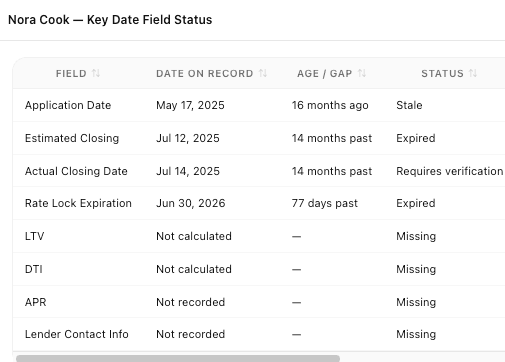
This brief worked from the loan record only, with no rate quote or eligibility decision in it. The proposed steps sat under it as buttons for a person to review.
What she does on her own, and what waits for you
Leaf360 is the AI Operating System for mortgage. Anything that changes a record waits for you to say yes.
New records wait for your click
Ask her to create a lead, a contact, a loan, a task or a note and she puts a card in the Results panel with what she understood. Fix anything she got wrong, then click the button. Close the panel and nothing's saved.
Workflows get built turned off
Tell her the automation you want and she'll ask for the trigger, the actions, the timing and the conditions. She builds it turned off. You read it, then you switch it on.
Follow-up that matches the person
She can run a DISC assessment with you and save the client's profile on their record, so that way your tone and your channel fit the person.
Unlimited email from your own inbox, on every plan
Connect Gmail or Outlook in Settings and every one-to-one email goes out from your own address, no monthly cap. Free included. Bulk campaigns live on Pro.
See what each plan includesMost mortgage CRMs added an AI feature. Leaf360 started as one.
In most CRMs, "AI" means a chatbot, a lead score, or a subject line written for you. Lia takes on the role of anybody at your mortgage company: loan officer, processor, LOA, underwriter. She reads your leads and your loans, works through the docs you attach, and drafts the work. You approve it instead of doing it.
What you need before you start
Four things, none of them a sales call.
- A free account. You don't need a credit card.
- Your stages, set up first, so that way every other screen reads off them.
- Gmail or Outlook connected under Settings. That's what makes your one-to-one email unlimited.
- A CSV of your leads and business contacts. Rows that match a record you already have update it, so you don't get duplicates.
Connects to
“Wonderful and customized help. Everyone there is great to work with. Nicolas has been a huge asset to my team.”
Travis Wendt · Motto Mortgage
Leaf360 holds 4.3 out of 5 from 4 verified reviews on Capterra, GetApp and Software Advice, which share one review pool. Read the reviews, including the critical ones.
Questions loan officers ask
In this order. Set up your stages first, so that way every other screen reads off them. Then import your leads and business contacts from a CSV. Connect your LOS last, once your own stages exist to map its statuses onto.
Your next client is already in somebody's pipeline.
Make sure it's yours, and make sure the follow-up doesn't depend on your memory.